Keep your SQL Servers the same.
SQLParity compares the SQL Server instances that are supposed to match, shows you exactly what drifted, and lets you fix it with one reviewed click, so a failover never leaves you with orphaned users or missing jobs.
Or install it with winget:
winget install --id XP9MFLZ33LSFTC -s msstore
Price: $79 / year - includes 2 licensesLicense termsRefund policy
Windows. The free 7-day trial starts from inside the app and needs an email address. Buy a license afterwards; pricing is on Products & Services.
See it work in four minutes
A short demo of SQLParity comparing a group of servers and showing what drifted. All servers, logins and jobs in it are made-up demo data.

In this demo
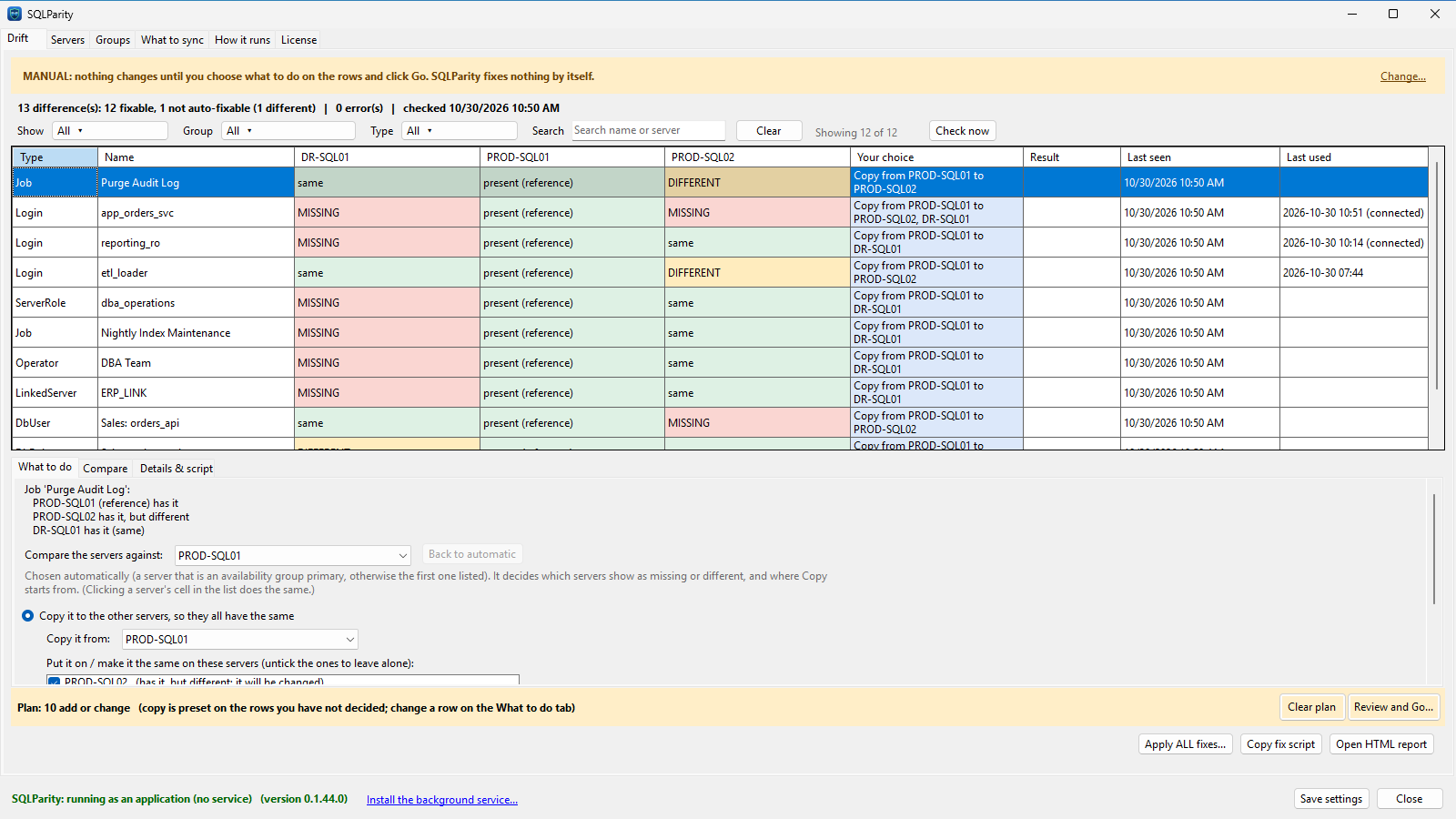
- The Drift grid: one row per object, one column per server, with green for present, red for missing and amber for different
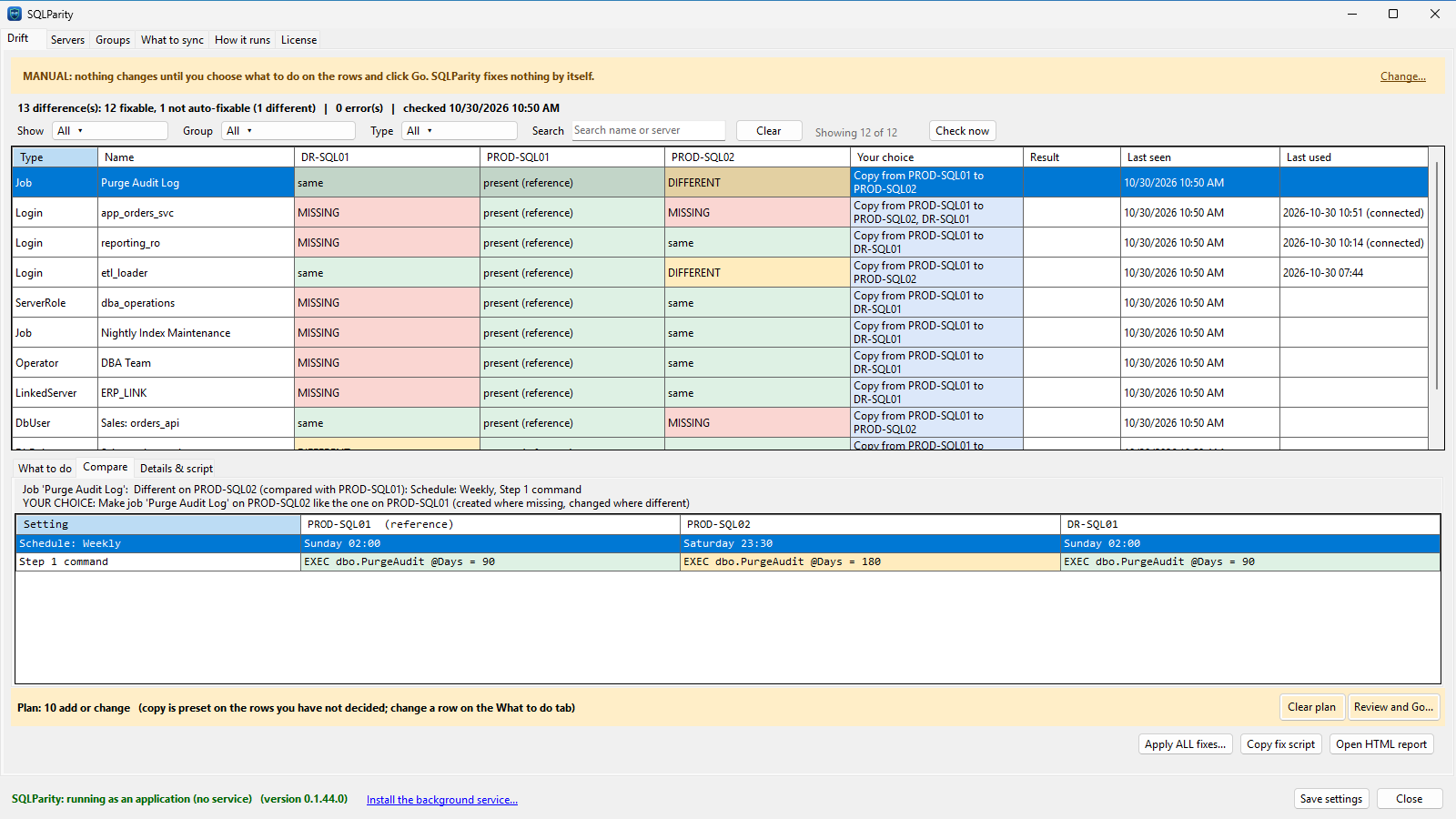
- Comparing a row side by side, setting by setting (password hashes are never shown)
- Choosing what to do: copy to the other servers, pick the server to copy from, leave servers out, do nothing, never report or delete
- The plan: every action listed in plain words, and nothing runs until you click Go
- Server configuration and hardware differences
- Several groups on the same servers, such as production against UAT, and the next-check countdown
The server that fails over is the one nobody kept up to date.
A login is added on the primary and never on the DR server. A SQL Agent job is changed on one replica only. A password hash drifts, a linked server is missing, and the failover you tested last quarter fails in production with users who can no longer sign in.
SQLParity closes that gap. It compares the servers in each group on a schedule and shows you, side by side, what is different and which server has the version you want.
What SQLParity compares
The things that go out of step between SQL Server instances, checked for every group of servers.
Logins
Logins with their SIDs and password hashes, so users keep working after a failover, plus server roles and server permissions.
Agent jobs and operators
SQL Agent jobs and operators, so the same maintenance and alerts run wherever the databases are.
Linked servers
Linked servers that exist on one instance and are missing on another.
Database users and permissions
Database users, roles and permissions, including users orphaned from their login.
Hardware and configuration
CPU, memory, drives, instance facts and server configuration options, shown for comparison only. SQLParity never changes them unless you pick Copy for a configuration option yourself.
Groups of servers
Availability group replicas, DR pairs, migration copies or plain standalone servers. A server can be in several groups, and each group can have its own reference server and its own list of what to compare.
You stay in control
Report only, or fix on request. Nothing changes until you review the plan and click Go, and deleting anything needs you to type REMOVE.
See it in action
All servers, logins and jobs shown are made-up demo data.
Every difference in one grid
One row per object and one column per server: green where it is present, red where it is missing and amber where it is different. Nothing changes until you choose what to do and click Go.
Compare it setting by setting
Open a row to see the servers side by side. Here an Agent job's schedule and step command differ on one server, and the plan says which server it will be copied from.
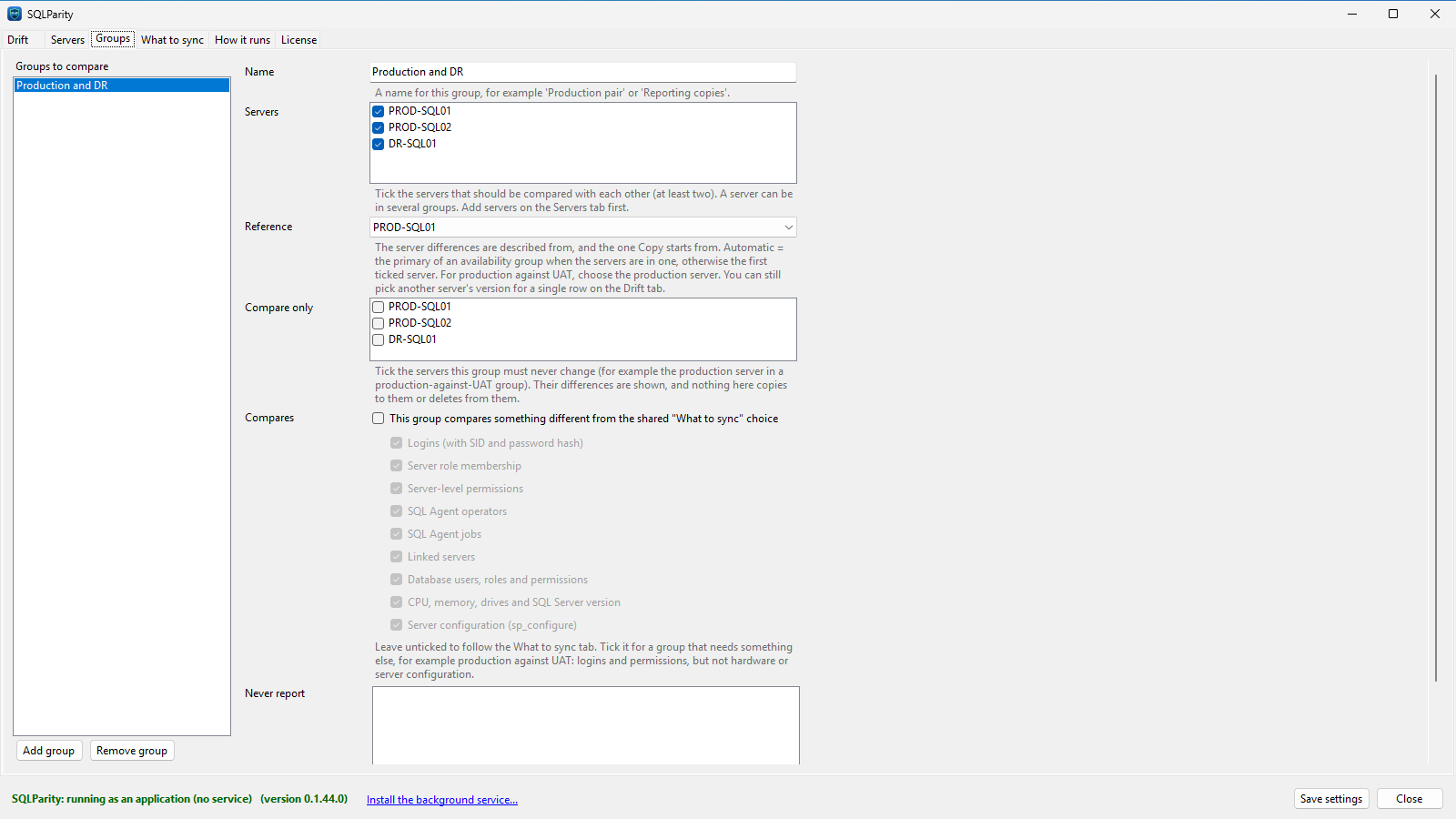
Groups of servers
Put the servers that should match into a group and pick its reference server, or let SQLParity use the availability group primary. Mark servers as compare only so nothing is ever copied to them, and give a group its own list of what to compare.
Free 7-day trial, then a license
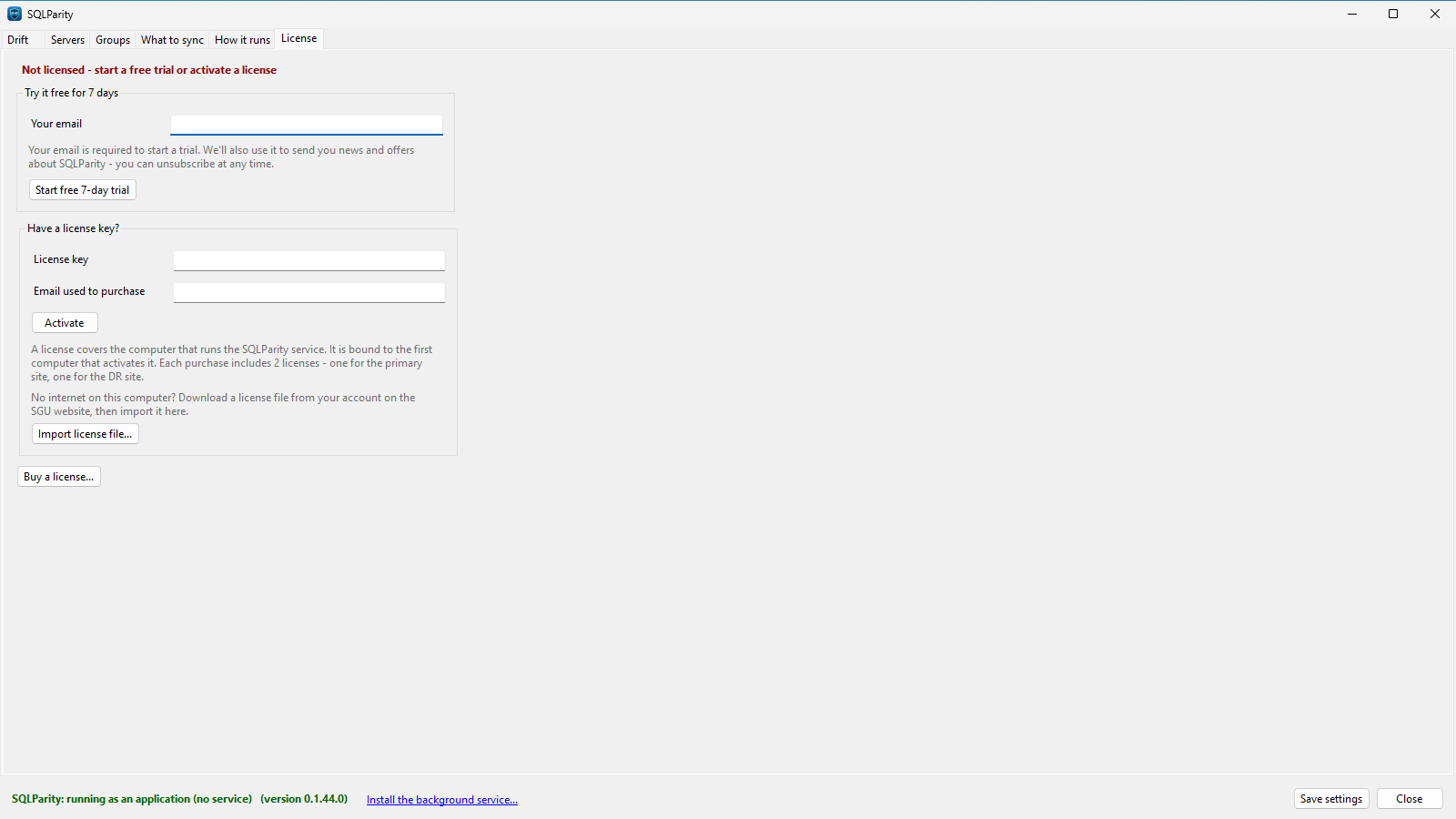
Start the trial from inside the app with your email address, or activate a license key. A computer with no internet can import a license file instead.
Plans
Every plan is a full SQLParity license with sync and drift checks on any number of servers, and includes 2 licenses (for example primary and DR site). The Access review plans add the quarterly access review for up to the number of SQL Server instances shown.
| Plan | Access review | Yearly | Quarterly | Buy |
|---|---|---|---|---|
| SQLParity | Not included | $79 a year | — | |
| SQLParity + Access review 10 | up to 10 SQL Server instances | $490 a year | $129 a quarter | |
| SQLParity + Access review 50 | up to 50 SQL Server instances | $1,490 a year | $399 a quarter | |
| SQLParity + Access review 100 | up to 100 SQL Server instances | $2,490 a year | $649 a quarter | |
| SQLParity + Access review Unlimited | any number of SQL Server instances | $4,990 a year | $1,299 a quarter |
What the Access review does
The Access review tab answers the auditor's question "who can reach what?" for every SQL Server in the server list, read-only:
logins, server roles and permissions, and in every online database the users, nested roles and permissions, rolled up into
one line per person per database, with Windows groups expanded to people through Active Directory. It flags shared SQL
logins, logins without the password policy, sa enabled, sysadmins, disabled or deleted Windows accounts,
orphaned users and guest access, shows what changed since the last review, records Keep or Remove decisions, proves the
removals with a follow-up scan, and exports a signed evidence pack (PDF, CSV and a hashed manifest).
The plan's number counts the SQL Server instances the review covers: every server in the list by default, or only the ones you pick under "Servers the review covers" on the How it runs tab (for example production only). Syncing is never limited. Step by step, and the queries to do it by hand: SQL Server quarterly access review in 30 minutes.
Set it up once
Three steps, and then it watches your servers and tells you when they drift.
List your servers
Add each SQL Server instance with the sign-in SQLParity should use, then put the ones that should match into a group.
Let it compare
SQLParity checks each group on a schedule, or when you click Check now, and lists every difference with the servers side by side.
Decide and go
For each difference choose to copy it to the other servers, never report it, delete it, or do nothing for now, review the plan, and click Go.
Questions
Short answers to the things people ask first.
Does it send my server details or data to you?
No. SQLParity connects only to the SQL Server instances you list, from your own network. Your server data (logins, jobs, settings, reports) is never sent to us. The network traffic to us is the license check and error reports about SQLParity itself (always sent, no setting to turn them off) (the error text can name the server, login or job it was working on), both described in our privacy policy.
Does it need an availability group?
No. It works for availability group replicas, DR pairs, migration copies and ordinary standalone servers. When a server reports itself as an availability group primary, SQLParity uses it as the point of view automatically.
Will it change my servers without asking?
No. By default SQLParity only reports. Changes are made only when you review a plan and click Go. It never deletes anything unless you explicitly choose to remove an item, and removal asks you to type REMOVE first.
SQLParity or dbatools?
dbatools is a free, open-source PowerShell module that many DBAs already use, and it is a strong choice if you like to script everything. Its Compare-DbaAvailabilityGroup command compares Agent jobs, logins, credentials and operators across the replicas of an availability group, and commands such as Copy-DbaLogin copy them. SQLParity is a Windows app for people who would rather see the drift and decide on it: a side-by-side view per group of servers (availability group or not), logins compared by SID and password hash, changed Agent job steps and schedules, linked servers, database users and server settings, and a plan you review before anything changes. It does not compare credentials or proxies. It has a command line check too, but if you want the whole job in PowerShell, use dbatools.
Do SQL Server 2022 contained availability groups make this unnecessary?
For part of the job they can. In a contained availability group (SQL Server 2022 and later), the logins, users, permissions and Agent jobs you create while connected through the group's listener are stored in the group's own master and msdb and stay the same on every replica. They do not cover objects created by connecting to the server name instead of the listener, server configuration (sp_configure can only be changed at instance level), regular availability groups you already run, DR pairs and migration copies that are not in an availability group, or servers older than SQL Server 2022. That is where SQLParity still helps: it compares the instance-level logins, Agent jobs, linked servers and settings of the servers you list. More in our guide to syncing logins and jobs.
How does it run?
As a tray application on its own, or together with a Windows service that keeps checking while no one is signed in. The installer asks which you want, and you can switch later from the window.
Does it tell me when there is a new version?
Yes. SQLParity checks in the background and shows a quiet notice in its window when a new version is out. It never downloads or installs anything by itself, and you can turn the messages off. Administrators can switch the check off for every SGU application on a computer with a registry policy. The window also has a light and a dark theme, or it can follow Windows.
What does one license cover?
Each license covers one installation, and one installation can compare any number of server groups. One purchase includes 2 licenses, for example one for the primary site and one for the DR site.
Can I try it first?
Yes, with a free 7-day trial you start from inside the app. An email address is required to start the trial; we also use it to send news and offers about SQLParity, and every message has an unsubscribe link.
How do I buy it?
See the Products & Services page for pricing and purchase options.
Also from Solutions Group Unlimited: LogTrawler, which collects SQL Server and Windows logs from many servers into one search, remote SQL Server DBA services and RestoreMD, nightly eClinicalWorks backup restore to SQL Server. Guides: sync SQL Server logins and Agent jobs across replicas, transfer SQL Server logins with their SID and password, compare SQL Agent jobs between two servers and a SQL Server quarterly access review in 30 minutes. Free tool: SQL login script generator (logins with SID and password hash, runs in your browser).
Find out before the failover does.
Let SQLParity show you what is different between your servers, and fix it on your terms.
Price: $79 / year - includes 2 licensesLicense termsRefund policy
Windows. The free 7-day trial starts from inside the app and needs an email address. Buy a license afterwards; pricing is on Products & Services.