Every scheduled task and SQL Agent job, on one screen.
TaskPier watches the Windows Task Scheduler tasks and SQL Server Agent jobs on all your servers, shows each one's last run, result, next run and duration in one grid, and alerts you when a job fails, does not run when it should have, runs far too long, or a server cannot be read.
Windows. The free 7-day trial starts from inside the app and needs an email address.
The job that failed quietly is the one you hear about last.
The nightly export, the cleanup script, the backup job: scheduled work is spread over Task Scheduler on a dozen servers and SQL Agent on a few instances, and each place keeps its own history. A task that stopped running last month, or a job that has been "running" for six hours, stays unnoticed until someone asks where their report is.
TaskPier reads all of them from one computer, on a schedule, and tells you the moment one goes wrong, and again when it is fine.
What you get
One Windows service and a tray app on a computer that can reach your servers. Nothing to install on the servers themselves.
Every job in one grid
Task Scheduler tasks and SQL Agent jobs from every server, coloured by status, with filters for problems only, server, source and text. Select a job to see what its last result means, its message, run-as account, triggers, actions and run history.
Failed
A task whose last result is not in your list of success codes, or a SQL Agent job that failed or was canceled.
Missed
A run that was due and did not start: more than 15 minutes late by default, or the grace you give that job.
Running too long
Still running after 120 minutes, after 3 times its usual duration, or after its own limit. Set the minutes per job, or ignore a job altogether.
Server not readable
Three failed checks in a row on a server or instance raise an alert, so a firewall change or an expired right does not hide a whole server's jobs.
Alerts without the noise
One message when a job goes bad, one when it is fine again, optional reminders. Everything found in one check goes out as one message per channel: email through your own mail server, Microsoft Teams, Slack or a JSON webhook. Each channel has "Send test alert".
Read only
TaskPier never starts, stops, changes or deletes a task or a job, and needs no change to your jobs or scripts. It reads with the Windows account its service runs as and stores no passwords for your servers.
Who may do what
Two local groups: TaskPier Users may view, TaskPier Admins may change settings (local administrators may always do both). An audit log records who changed what and when.
Nothing else to install
The .NET runtime is built in. The installer sets up the service and the tray app, and an unattended install is one command line (/VERYSILENT).
See it in action
All servers and jobs shown are made-up demo data.
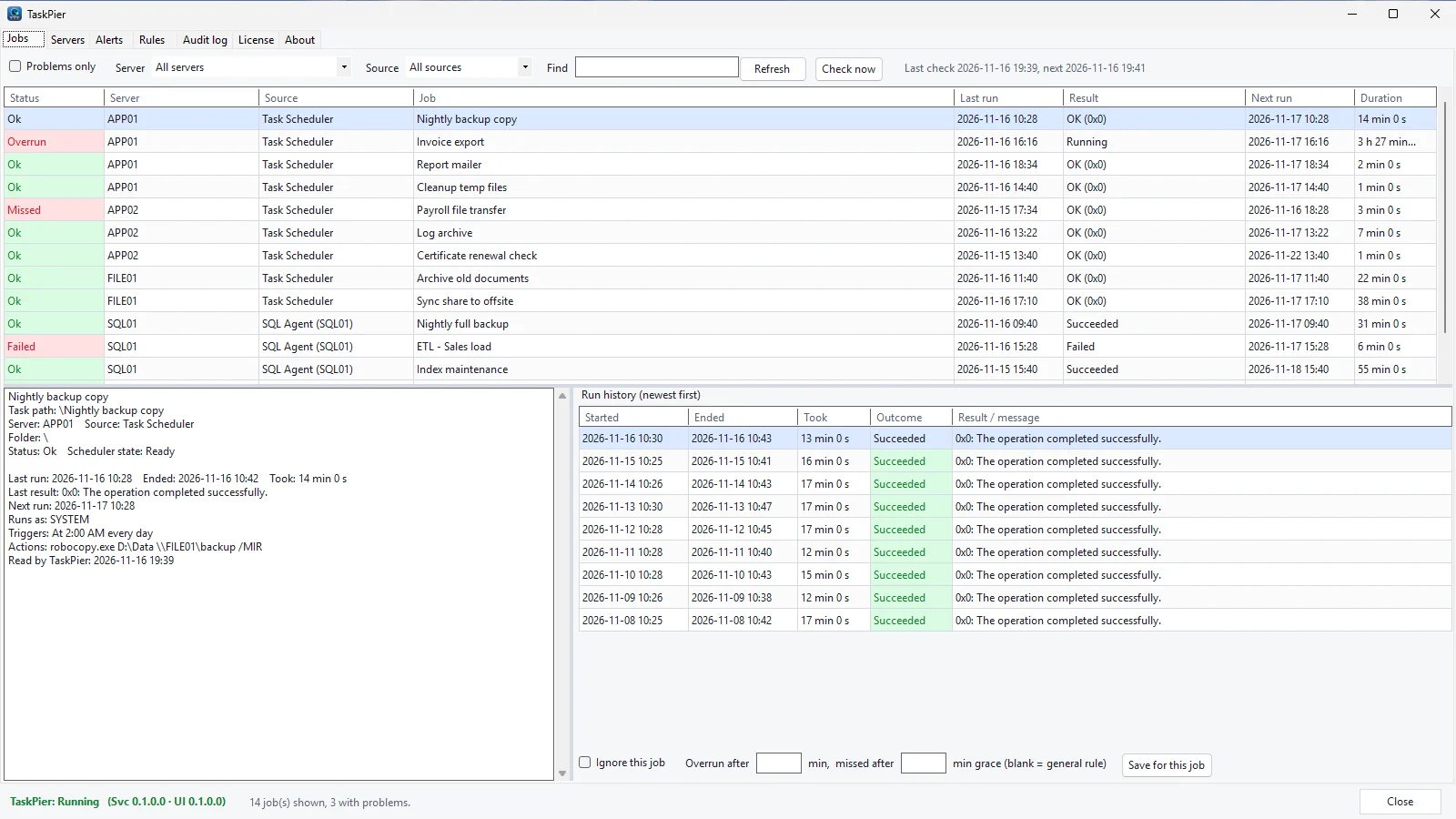
Every task and job in one grid
Task Scheduler and SQL Agent side by side, coloured by status: a job running far too long, a missed run and a failed SQL Agent job stand out. Select one to see its trigger, action, last result and run history.
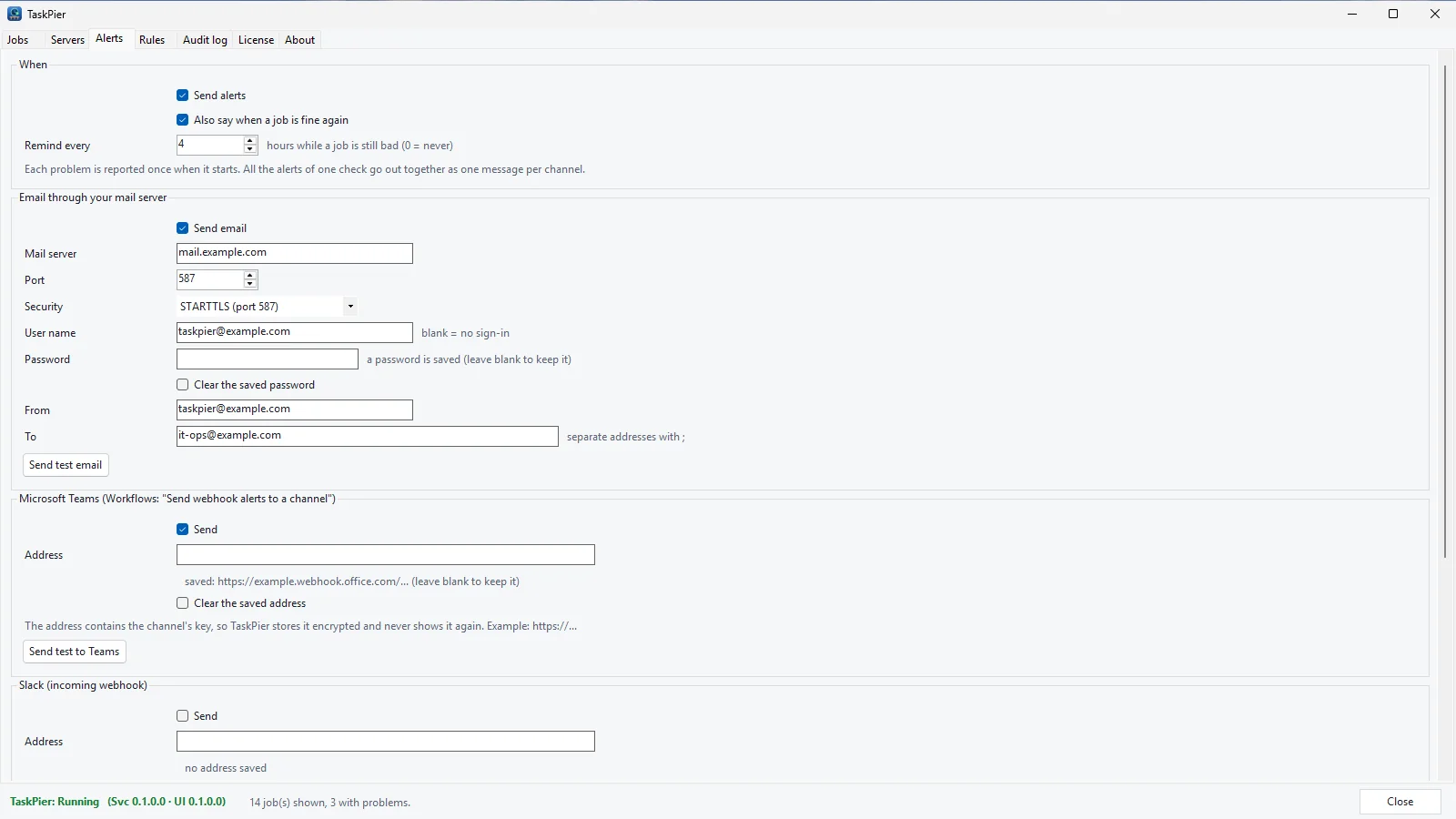
Alerts where your team looks
Email through your own mail server, Microsoft Teams, Slack or a webhook, with a reminder while a job is still bad and a message when it is fine again. Webhook addresses and the mail password are stored encrypted.
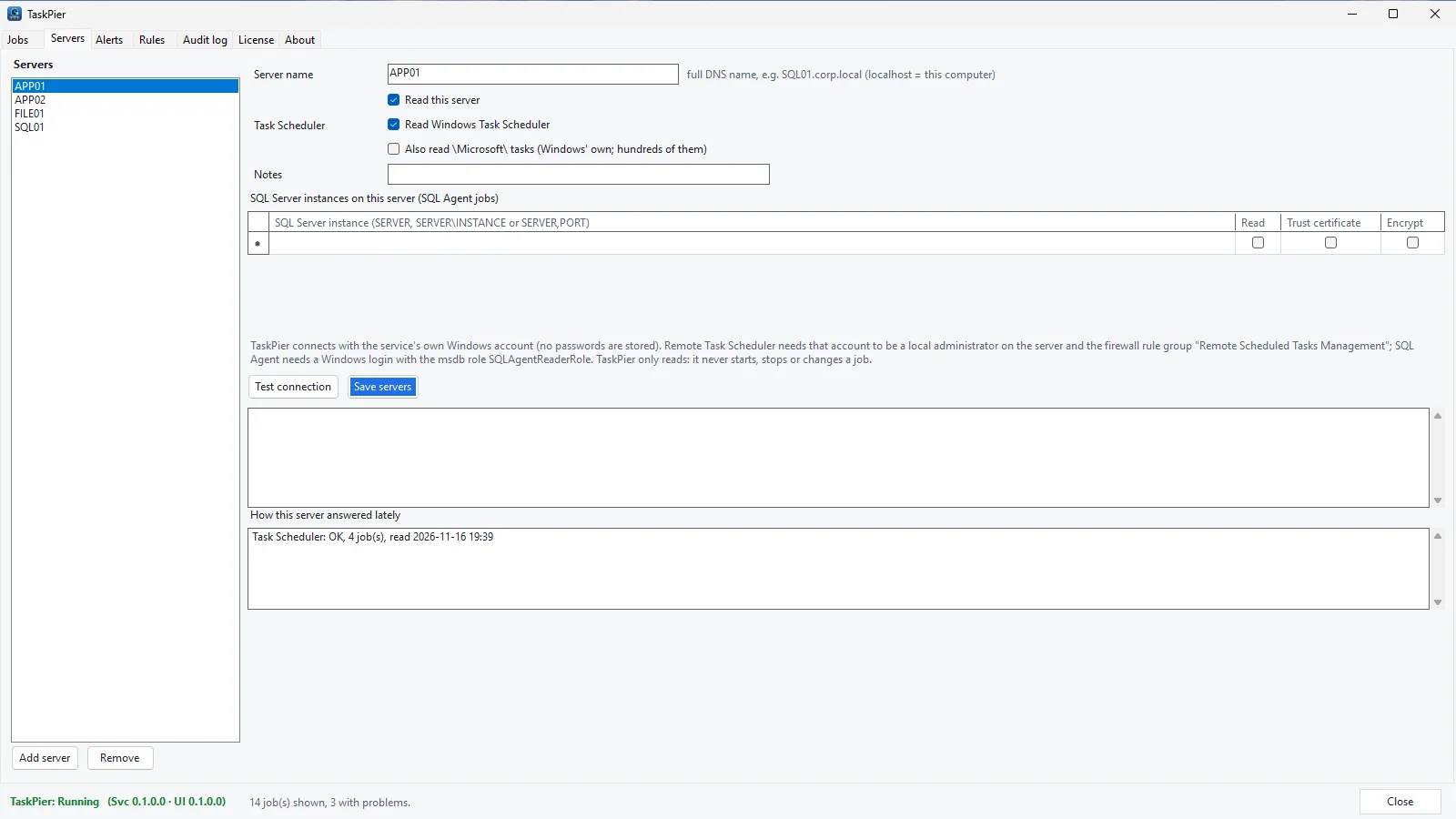
Servers, read with one account
Add each server and its SQL Server instances. TaskPier reads them with its service's Windows account, stores no passwords, and shows how each server answered on the last check.
Set it up once
Three steps, and then it checks your servers on a schedule.
Install and pick an account
Install TaskPier on a computer that can reach your servers. It reads with its service account: Local System by default, or better a group managed service account (gMSA) with just the rights below.
Add your servers
List each server by its full DNS name, and each SQL Server instance. "Test connection" says exactly which right or firewall rule is missing.
Choose where alerts go
Add your mail server, a Teams or Slack webhook, or your own JSON endpoint, send a test alert, and leave it running.
Plans
Yearly plans by how many servers TaskPier watches. Every plan has every feature and the same free 7-day trial.
| Plan | Servers watched | Price | Buy |
|---|---|---|---|
| Starter | up to 5 servers | $49 | |
| Team | up to 15 servers | $99 | |
| Business | up to 50 servers | $199 | |
| Unlimited | any number of servers | $399 |
- The free 7-day trial has no server limit, whichever plan you buy afterwards.
- A server is one machine TaskPier reads. Several SQL Server instances on the same machine count as one server.
- One license is one TaskPier installation (the computer that runs the service and the console).
- Each purchase gives you a TaskPier license key that carries the plan's server limit; enter it on the License tab.
Requirements and rights
| What | Needs |
|---|---|
| The computer TaskPier runs on | Windows Server 2016 or later, or Windows 10 or later, 64-bit. No .NET install needed. |
| Task Scheduler on another server | The service account is a member of that server's local Administrators group (Windows lets only administrators read another computer's scheduled tasks), and its firewall allows the rule group "Remote Scheduled Tasks Management" (TCP 135 and the RPC dynamic ports). |
| SQL Server Agent | SQL Server 2012 or later with SQL Server Agent (Express has no Agent). The service account's login is a member of SQLAgentReaderRole in msdb; a few optional SELECT grants on the msdb job tables add running jobs' start times for the running-too-long alerts. TCP 1433 or the instance's port. |
| Alerts | Outbound to your mail server (SMTP 25, 587 or 465) and HTTPS 443 to Teams, Slack or your webhook. |
| Licensing | Outbound HTTPS 443 to the SGU licensing service (trial, activation, a check about every 12 hours). Nothing inbound: the service's own API listens on 127.0.0.1 only, for the tray app. |
The README that comes with TaskPier has the exact commands: the gMSA switch, the firewall rule and an idempotent T-SQL script for the msdb rights, with its rollback.
Questions
Short answers to the things people ask first.
Does TaskPier change, start or stop my jobs?
No. This version only reads: it never starts, stops, changes or deletes a scheduled task or a SQL Agent job, and it needs no change to your jobs or scripts.
Do I have to install anything on each server?
No. TaskPier runs on one computer and reads the other servers over the network with its service account: Task Scheduler over RPC (the account must be a local administrator on the server, and the "Remote Scheduled Tasks Management" firewall rules must be on) and SQL Server Agent through msdb (membership of SQLAgentReaderRole).
Which account does TaskPier read with?
The Windows account its service runs as. By default that is Local System, which other computers see as the computer account. We recommend a group managed service account (gMSA) that you grant exactly the rights it needs; TaskPier stores no passwords for your servers.
What counts as a missed run?
A run that was due more than 15 minutes ago and has not started. You can give a job its own grace minutes, or tell TaskPier to ignore it.
Where do the alerts go?
By email through your own mail server, to Microsoft Teams, to Slack, or to any JSON webhook. One message when a job goes bad and one when it is fine again, with optional reminders; everything found in one check is sent together, one message per channel.
Does any information about my servers leave my network?
No. Your servers, jobs, run history and settings stay on the computer where TaskPier runs. It contacts us only for licensing (the license key, the email address for the trial and activation, a hashed machine id, the product name and version) and for the update check. Alerts go only to the mail server and webhooks you enter, and the SMTP password and webhook addresses are stored encrypted.
Is there a free trial?
Yes, 7 days, with no server limit. Start it on the License tab inside the app with your email address.
How is TaskPier priced?
By year and by how many servers it watches: Starter up to 5 servers, Team up to 15, Business up to 50 and Unlimited for any number. Every plan has every feature. A server is one machine; several SQL Server instances on it count once. One license covers one TaskPier installation. Prices are in the plans table.
Does it work with SQL Server Express?
SQL Server Express has no SQL Server Agent, so there are no Agent jobs to read. Task Scheduler on the same server works as usual.
Also from Solutions Group Unlimited: SvcSentinel, which restarts Windows services when they stop, SQLParity, which keeps SQL Server logins and Agent jobs the same across servers and LogTrawler, server logs from many machines in one search. Free tool: cron expression builder. Guide: restart a Windows service on a schedule.
Know when a job fails, before anyone asks.
One screen for the scheduled work on all your Windows servers and SQL Server instances.
Windows. The free 7-day trial starts from inside the app and needs an email address. Questions: support@solutionsgroupunlimited.com.